Next.js Introduction: Complete Guide for Beginners 2026
What is Next.js?
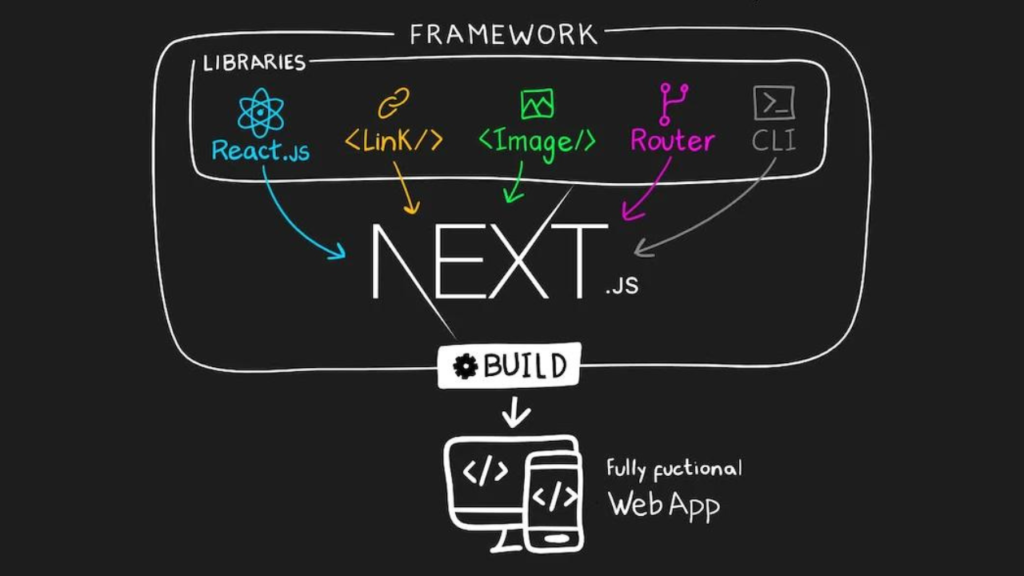
Next.js is a React framework created by Vercel that enables you to build production-ready web applications with ease. While React gives you the power to build user interfaces, it leaves critical decisions about routing, data fetching, and rendering up to you. Next.js fills these gaps by providing a complete toolkit out of the box.
Think of React as the engine of a car, and Next.js as the entire vehicle — complete with wheels, steering, navigation, and safety features.
Why Use Next.js?
If you've built apps with plain React, you've likely faced these challenges:
| Problem | How Next.js Solves It |
|---|---|
| Complex routing setup | File-based routing built-in |
| SEO struggles with SPAs | Multiple rendering strategies (SSR, SSG) |
| Slow initial page loads | Automatic code splitting & optimization |
| Manual server configuration | API routes & full-stack capabilities |
| Performance optimization | Image optimization, font optimization, lazy loading |
Bottom line: Next.js helps you ship faster, perform better, and scale easier.
Next.js vs React
| Feature | React | Next.js |
|---|---|---|
| Type | UI Library | Full Framework |
| Routing | Manual (React Router) | File-based |
| Rendering | Client-side only | SSR, SSG, ISR, CSR |
| SEO | Requires extra setup | Built-in optimization |
| API Backend | Needs separate server | Built-in API routes |
| Image Optimization | Manual | Automatic (next/image) |
Analogy: React is like buying ingredients. Next.js is a meal kit with everything pre-measured and instructions included.
Next.js vs Traditional SPA (Single Page Application)
A traditional SPA (built with React + React Router) sends a nearly empty HTML file to the browser, then JavaScript renders everything. This causes:
- ❌ Poor SEO (search engines see blank pages)
- ❌ Slow First Contentful Paint (FCP)
- ❌ No content until JS downloads
Next.js solves this by rendering pages on the server or at build time, sending fully populated HTML to the browser.
Rendering Strategies in Next.js
Next.js offers four powerful rendering strategies. Understanding these is crucial.
1. Server-Side Rendering (SSR)
HTML is generated on the server for every request.
1// app/blog/[slug]/page.js 2export default async function BlogPost({ params }) { 3 const post = await fetch(`https://api.example.com/posts/${params.slug}`, { 4 cache: 'no-store' // Fresh data every request 5 }).then(res => res.json()); 6 7 return ( 8 <article> 9 <h1>{post.title}</h1> 10 <p>{post.content}</p> 11 </article> 12 ); 13}
Best for: Real-time data, user-specific content, dashboards.
2. Static Site Generation (SSG) — Static Rendering
HTML is generated at build time and reused for every request.
1// app/about/page.js 2export default async function AboutPage() { 3 const data = await fetch('https://api.example.com/team', { 4 cache: 'force-cache' // Cached indefinitely 5 }).then(res => res.json()); 6 7 return ( 8 <div> 9 <h1>Our Team</h1> 10 {data.members.map(member => ( 11 <TeamCard key={member.id} member={member} /> 12 ))} 13 </div> 14 ); 15}
Best for: Blogs, marketing pages, documentation — content that doesn't change often.
3. Dynamic Rendering
A hybrid approach where Next.js automatically decides whether to render statically or dynamically based on the data fetching patterns used.
1// Next.js intelligently chooses the strategy 2export default async function ProductPage({ params }) { 3 const product = await fetch(`https://api.example.com/products/${params.id}`); 4 // If 'no-store' is used → Dynamic 5 // If 'force-cache' is used → Static 6 return <ProductDetails product={product} />; 7}
4. Client-Side Rendering (CSR)
Traditional React rendering inside the browser. Still useful for interactive parts.
1'use client'; // Mark as Client Component 2 3import { useState, useEffect } from 'react'; 4 5export default function LikeButton() { 6 const [likes, setLikes] = useState(0); 7 8 useEffect(() => { 9 fetch('/api/likes').then(res => res.json()).then(data => setLikes(data.count)); 10 }, []); 11 12 return <button onClick={() => setLikes(l => l + 1)}>❤️ {likes}</button>; 13}
Best for: Interactive UI elements, real-time updates, user interactions.
The App Router (Next.js 13+)
The App Router is the modern way to build Next.js applications using the app/ directory.
my-app/
├── app/                    ← App Router
│   ├── layout.js           ← Root layout (wraps all pages)
│   ├── page.js             ← Home page (/)
│   ├── about/
│   │   └── page.js         ← About page (/about)
│   ├── blog/
│   │   ├── page.js         ← Blog listing (/blog)
│   │   └── [slug]/
│   │       └── page.js     ← Individual post (/blog/hello-world)
│   └── api/
│       └── hello/
│           └── route.js    ← API endpoint (/api/hello)
├── components/             ← Reusable React components
├── public/                 ← Static assets
└── next.config.js
Why App Router Over Pages Router?
| Feature | Pages Router | App Router |
|---|---|---|
| Server Components | ❌ Not supported | ✅ Default |
| Layouts | Manual (_app.js) | Nested layouts |
| Loading States | Manual | Built-in loading.js |
| Error Handling | Manual | Built-in error.js |
| Streaming | Limited | Full support |
Recommendation: If you're starting fresh, use the App Router. It's the future of Next.js.
Server Components vs Client Components
This is the most important concept in modern Next.js.
Server Components (Default)
Run exclusively on the server. They:
- ✅ Can access databases and APIs directly
- ✅ Reduce JavaScript sent to the browser
- ✅ Improve initial page load
- ❌ Cannot use hooks like
useState,useEffect - ❌ Cannot use browser APIs
1// app/page.js — Server Component by default 2import { db } from '@/lib/db'; 3 4export default async function HomePage() { 5 const posts = await db.post.findMany(); // Direct DB access! 6 7 return ( 8 <main> 9 <h1>Latest Posts</h1> 10 {posts.map(post => <PostCard key={post.id} post={post} />)} 11 </main> 12 ); 13}
Client Components
Run in the browser. Use them for interactivity.
1'use client'; // ← This directive makes it a Client Component 2 3import { useState } from 'react'; 4 5export default function Counter() { 6 const [count, setCount] = useState(0); 7 return <button onClick={() => setCount(c => c + 1)}>Count: {count}</button>; 8}
The Golden Rule
Start with Server Components. Only use
'use client'when you need interactivity (state, effects, event handlers, browser APIs).
Full-Stack Capabilities
Next.js isn't just a frontend framework — it's full-stack. You can build API endpoints right inside your project.
1// app/api/users/route.js 2import { NextResponse } from 'next/server'; 3 4export async function GET() { 5 const users = await db.user.findMany(); 6 return NextResponse.json(users); 7} 8 9export async function POST(request) { 10 const body = await request.json(); 11 const newUser = await db.user.create({ data: body }); 12 return NextResponse.json(newUser, { status: 201 }); 13}
No separate backend server needed. Deploy one codebase to Vercel, and both frontend and backend work seamlessly.
Next.js Project Architecture
A well-organized Next.js project looks like this:
tech3space/
├── app/
│   ├── (marketing)/           ← Route group (no URL segment)
│   │   ├── page.js            ← Landing page
│   │   ├── about/page.js
│   │   └── pricing/page.js
│   ├── (dashboard)/           ← Another route group
│   │   ├── dashboard/
│   │   │   ├── page.js
│   │   │   ├── layout.js      ← Dashboard-specific layout
│   │   │   └── settings/page.js
│   ├── api/                   ← Backend API routes
│   ├── globals.css
│   └── layout.js              ← Root layout
├── components/
│   ├── ui/                    ← Reusable UI (Button, Input, Card)
│   └── sections/              ← Page sections (Hero, Footer)
├── lib/
│   ├── db.js                  ← Database connection
│   └── utils.js               ← Helper functions
├── public/
│   └── images/
├── styles/
├── next.config.js
├── tailwind.config.js
└── package.json
Real-World Production Use Cases
1. Blog Website
Rendering: Static Generation (SSG)
Why: Content is written once, read many times. Pre-render at build time for blazing speed.
app/blog/
├── page.js          ← List all posts
└── [slug]/
    └── page.js      ← Individual post (SSG)
2. Documentation Website
Rendering: Static Generation with ISR (Incremental Static Regeneration)
Why: Docs update occasionally. ISR allows updates without full rebuilds.
1// Revalidate every hour 2export const revalidate = 3600;
3. E-Commerce Website
Rendering: Hybrid (SSG for product pages, SSR for cart/checkout)
Why: Product pages need SEO + speed. Cart needs real-time data.
app/
├── products/
│   └── [id]/page.js     ← SSG (fast, SEO-friendly)
├── cart/page.js         ← Client Component (interactive)
└── checkout/page.js     ← SSR (secure, real-time)
4. Dashboard
Rendering: Server Components + Client Components
Why: Heavy data fetching on server, interactive charts on client.
1// app/dashboard/page.js — Server Component 2import SalesChart from '@/components/SalesChart'; // Client Component 3 4export default async function Dashboard() { 5 const sales = await fetchSalesData(); // Server-side fetch 6 7 return ( 8 <div> 9 <h1>Dashboard</h1> 10 <StatsCards data={sales} /> {/* Server */} 11 <SalesChart data={sales} /> {/* Client (interactive) */} 12 </div> 13 ); 14}
5. Learning Platform (Tech3Space Style)
Rendering: Hybrid approach
Architecture:
- Landing page: SSG (marketing content)
- Course catalog: ISR (updates when new courses added)
- Video player: Client Component (interactive controls)
- Progress tracking: SSR (user-specific data)
- Payment: API Routes (Stripe integration)
6. Admin Panel
Rendering: Server Components for data, Client for forms
Features:
- Authentication middleware
- Role-based access
- Data tables with server-side pagination
- Form submissions via API routes
Project: Tech3Space Learning Application — Initial Setup
Let's create the foundation of our learning platform.
Step 1: Initialize the Project
1npx create-next-app@latest tech3space 2# Choose: TypeScript, Tailwind CSS, App Router, ESLint 3cd tech3space 4npm run dev
Step 2: Project Structure
tech3space/
├── app/
│   ├── layout.js              ← Root layout with navigation
│   ├── page.js                ← Landing page
│   ├── courses/
│   │   ├── page.js            ← Course catalog
│   │   └── [slug]/
│   │       └── page.js        ← Course detail
│   ├── about/page.js
│   └── api/courses/route.js   ← Course API
├── components/
│   ├── Navbar.js
│   ├── HeroSection.js
│   ├── CourseCard.js
│   └── Footer.js
├── lib/
│   └── data.js                ← Mock course data
└── public/
    └── images/
Step 3: Root Layout
1// app/layout.js 2import './globals.css'; 3import Navbar from '@/components/Navbar'; 4import Footer from '@/components/Footer'; 5 6export const metadata = { 7 title: 'Tech3Space — Learn Tech Skills', 8 description: 'Master modern web development with hands-on courses', 9}; 10 11export default function RootLayout({ children }) { 12 return ( 13 <html lang="en"> 14 <body className="min-h-screen flex flex-col"> 15 <Navbar /> 16 <main className="flex-grow">{children}</main> 17 <Footer /> 18 </body> 19 </html> 20 ); 21}
Step 4: Landing Page (Server Component)
1// app/page.js 2import HeroSection from '@/components/HeroSection'; 3import CourseCard from '@/components/CourseCard'; 4import { getFeaturedCourses } from '@/lib/data'; 5 6export default async function Home() { 7 const courses = await getFeaturedCourses(); // Server-side data fetch 8 9 return ( 10 <div> 11 <HeroSection /> 12 <section className="py-16 px-4 max-w-7xl mx-auto"> 13 <h2 className="text-3xl font-bold mb-8">Featured Courses</h2> 14 <div className="grid grid-cols-1 md:grid-cols-3 gap-6"> 15 {courses.map(course => ( 16 <CourseCard key={course.id} course={course} /> 17 ))} 18 </div> 19 </section> 20 </div> 21 ); 22}
Step 5: Course API Route
1// app/api/courses/route.js 2import { NextResponse } from 'next/server'; 3import { courses } from '@/lib/data'; 4 5export async function GET() { 6 return NextResponse.json(courses); 7}
Key Takeaways
| Concept | Remember This |
|---|---|
| Next.js | React framework with built-in solutions |
| App Router | Modern routing with Server Components |
| Server Components | Default, run on server, great for data |
| Client Components | Use 'use client' for interactivity |
| SSR | Fresh data, every request |
| SSG | Pre-built, ultra-fast |
| Full-Stack | API routes in the same project |
What's Next?
In the upcoming modules, we'll dive deeper into:
- Routing and navigation patterns
- Data fetching strategies
- Database integration
- Authentication
- Deployment to production
Your mission: Set up the Tech3Space project locally and explore the file structure. Try modifying the landing page and adding a new route. The best way to learn is by building!
"Next.js doesn't just make React easier — it makes you a better developer by teaching you the right patterns from day one."