The Ultimate DevOps Handbook 2026: From Beginner to Production-Grade Mastery
The Ultimate DevOps Handbook 2026: From Beginner to Production-Grade Mastery
DevOps is the fusion of Development and Operations — a cultural and technical movement that delivers software faster, more reliably, and with higher quality. In this massive guide, we cover everything: culture, tools, pipelines, containerization, orchestration, IaC, monitoring, security, and real-world practices.
1. Understanding DevOps
What is DevOps?
DevOps is not just a toolset — it's a culture, a set of practices, and a philosophy. It breaks down silos between developers (who write code) and operations (who run infrastructure).
Key Principles (CALMS Framework):
- Culture: Collaboration, shared responsibility
- Automation: Everything that can be automated should be
- Lean: Eliminate waste
- Measurement: Data-driven decisions
- Sharing: Knowledge across teams
DevOps Lifecycle: Plan → Code → Build → Test → Release → Deploy → Operate → Monitor → Feedback
Evolution of DevOps
- 2009: First DevOpsDays conference
- 2010s: Rise of containers (Docker 2013)
- 2020s: Kubernetes dominance, GitOps, Platform Engineering
- 2026: AI-powered DevOps (AIOps), Platform Teams, Shift-Left Security
Benefits:
- Deployment frequency: From months to multiple times per day
- Lead time for changes: Reduced by 50-90%
- Mean Time to Recovery (MTTR): Drastically lower
2. DevOps Culture & Team Structures
Traditional vs DevOps:
- Silos → Cross-functional teams
- "It works on my machine" → "You build it, you run it"
Team Topologies (2026 best practice):
- Stream-Aligned Teams
- Platform Teams (Internal Developer Platform)
- Enabling Teams
- Complicated Subsystem Teams
Implementing Culture:
- Blameless Post-Mortems
- InnerSource
- ChatOps (Slack + GitHub integration)
3. Version Control & Branching Strategy
Git Best Practices:
1git config --global user.name "Your Name" 2git config --global user.email "you@example.com"
Git Flow vs Trunk-Based Development:
1# Feature branch workflow 2git checkout -b feature/new-login 3# ... work ... 4git push origin feature/new-login
Conventional Commits:
feat: add user authentication
fix: resolve login timeout
chore: update dependencies
4. Continuous Integration (CI)
GitHub Actions Example (Full Workflow)
1# .github/workflows/ci.yml 2name: CI Pipeline 3 4on: 5 push: 6 branches: [ main ] 7 pull_request: 8 9jobs: 10 test: 11 runs-on: ubuntu-latest 12 steps: 13 - uses: actions/checkout@v4 14 15 - name: Setup Node.js 16 uses: actions/setup-node@v4 17 with: 18 node-version: 20 19 20 - name: Install dependencies 21 run: npm ci 22 23 - name: Run lint 24 run: npm run lint 25 26 - name: Run tests 27 run: npm test 28 29 - name: Build 30 run: npm run build
Jenkins Pipeline (Declarative)
1pipeline { 2 agent any 3 stages { 4 stage('Build') { 5 steps { 6 sh 'echo "Building..."' 7 sh 'npm install' 8 } 9 } 10 stage('Test') { 11 steps { 12 sh 'npm test' 13 } 14 } 15 stage('SonarQube Analysis') { 16 steps { 17 withSonarQubeEnv('Sonar') { 18 sh 'sonar-scanner' 19 } 20 } 21 } 22 } 23 post { 24 always { 25 junit '**/test-results/*.xml' 26 } 27 } 28}
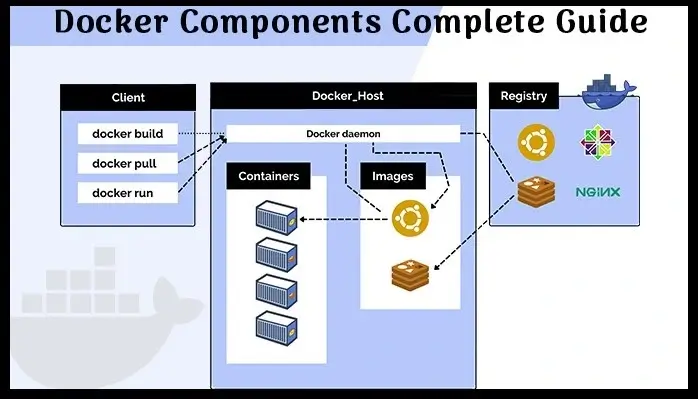
5. Containerization with Docker
(Referencing previous Docker tutorial)
Multi-Stage Dockerfile Best Practices 2026:
1FROM node:20-alpine AS builder 2WORKDIR /app 3COPY package*.json ./ 4RUN npm ci 5COPY . . 6RUN npm run build 7 8FROM node:20-alpine AS production 9WORKDIR /app 10ENV NODE_ENV=production 11COPY /app/package*.json ./ 12COPY /app/.next ./.next 13COPY /app/public ./public 14RUN npm ci --only=production 15EXPOSE 3000 16CMD ["npm", "start"]
.dockerignore:
node_modules
.git
.env
Dockerfile
6. Kubernetes Orchestration
(Expanded from previous tutorial)
Complete Deployment + Service + Ingress:
1# deployment.yaml 2apiVersion: apps/v1 3kind: Deployment 4metadata: 5 name: api-deployment 6spec: 7 replicas: 5 8 selector: 9 matchLabels: 10 app: api 11 template: 12 metadata: 13 labels: 14 app: api 15 spec: 16 containers: 17 - name: api 18 image: myregistry/api:v1.2.3 19 resources: 20 requests: 21 cpu: "200m" 22 memory: "256Mi" 23 limits: 24 cpu: "500m" 25 memory: "512Mi" 26 env: 27 - name: DB_HOST 28 valueFrom: 29 secretKeyRef: 30 name: db-secret 31 key: host
Horizontal Pod Autoscaler:
1apiVersion: autoscaling/v2 2kind: HorizontalPodAutoscaler 3metadata: 4 name: api-hpa 5spec: 6 scaleTargetRef: 7 apiVersion: apps/v1 8 kind: Deployment 9 name: api-deployment 10 minReplicas: 3 11 maxReplicas: 20 12 metrics: 13 - type: Resource 14 resource: 15 name: cpu 16 target: 17 type: Utilization 18 averageUtilization: 70
7. Infrastructure as Code (IaC) with Terraform
1# main.tf 2terraform { 3 required_providers { 4 aws = { 5 source = "hashicorp/aws" 6 version = "~> 5.0" 7 } 8 } 9} 10 11provider "aws" { 12 region = "us-east-1" 13} 14 15resource "aws_vpc" "main" { 16 cidr_block = "10.0.0.0/16" 17 tags = { 18 Name = "devops-vpc" 19 } 20} 21 22resource "aws_eks_cluster" "cluster" { 23 name = "devops-cluster" 24 role_arn = aws_iam_role.eks_role.arn 25 # ... more config 26}
Terraform Best Practices:
- Modular design
- Remote state with S3 + DynamoDB
terraform planin CI/CD
8. Continuous Deployment & GitOps
ArgoCD Example:
1# Application.yaml 2apiVersion: argoproj.io/v1alpha1 3kind: Application 4metadata: 5 name: myapp 6spec: 7 source: 8 repoURL: https://github.com/org/repo.git 9 targetRevision: HEAD 10 path: k8s 11 destination: 12 server: https://kubernetes.default.svc 13 namespace: production 14 syncPolicy: 15 automated: 16 prune: true 17 selfHeal: true
9. Monitoring, Logging & Observability
Prometheus + Grafana Stack:
1# docker-compose.monitoring.yml 2services: 3 prometheus: 4 image: prom/prometheus 5 volumes: 6 - ./prometheus.yml:/etc/prometheus/prometheus.yml 7 grafana: 8 image: grafana/grafana 9 ports: 10 - "3000:3000"
Key Metrics (RED Method):
- Rate, Errors, Duration
ELK / EFK Stack or Loki + Tempo + Grafana
10. DevSecOps & Security
Tools:
- Trivy for image scanning
- Snyk / Dependabot
- OPA / Gatekeeper policies
Example Trivy Scan:
1trivy image myapp:latest
Secrets Management:
- HashiCorp Vault
- AWS Secrets Manager
- Kubernetes Secrets + Sealed Secrets
Shift-Left Security:
- SAST, DAST, SCA in CI pipeline
11. Platform Engineering & Internal Developer Platforms (IDP)
- Backstage by Spotify
- Crossplane
- Terraform + ArgoCD + Backstage
12. Real-World Case Studies & Anti-Patterns
Success Story: How Company X reduced deployment time from 2 weeks to 2 hours.
Common Pitfalls:
- Tool sprawl
- Ignoring culture
- Over-automation without measurement
Conclusion & Learning Path
Master DevOps by:
- Learn Linux + Git + Docker
- Build CI/CD pipelines
- Deploy to Kubernetes
- Practice IaC
- Implement observability
- Contribute to open source
Resources:
- DevOps Roadmap (roadmap.sh)
- Kubernetes.io
- Terraform Registry
- CNCF Landscape